Wisprr: Voice Recorder
& AI Transcriber

Record conversations, lectures, and meetings with a floating overlay. Get instant AI-powered transcriptions that auto-copy to your clipboard. 100% free on every platform.

Wisprr Mockup
CAPTURE & TRANSCRIBE WITH A SINGLE TAP
Our Mission

We provide a secure, private,and powerful transcription platform

We believe your voice data should belong to you alone. Our mission is to build tools that empower your productivity and communication without compromising your privacy.

Wisprr Transcription
Transcription

AI-Powered Accuracy

Powered by Groq's Whisper large-v3-turbo model for lightning-fast, highly accurate transcriptions. Get your text in seconds, not minutes, with industry-leading speech recognition.
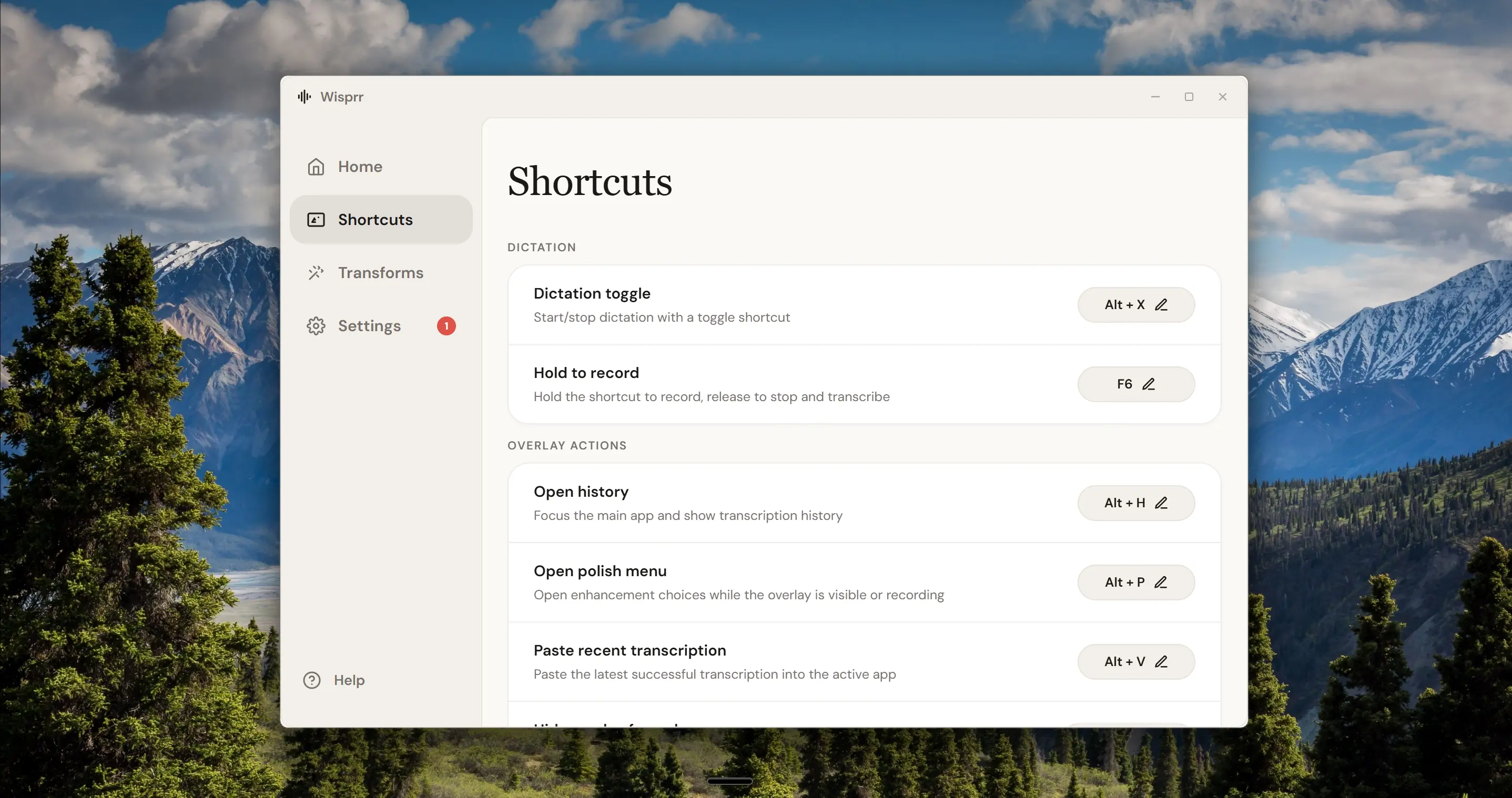
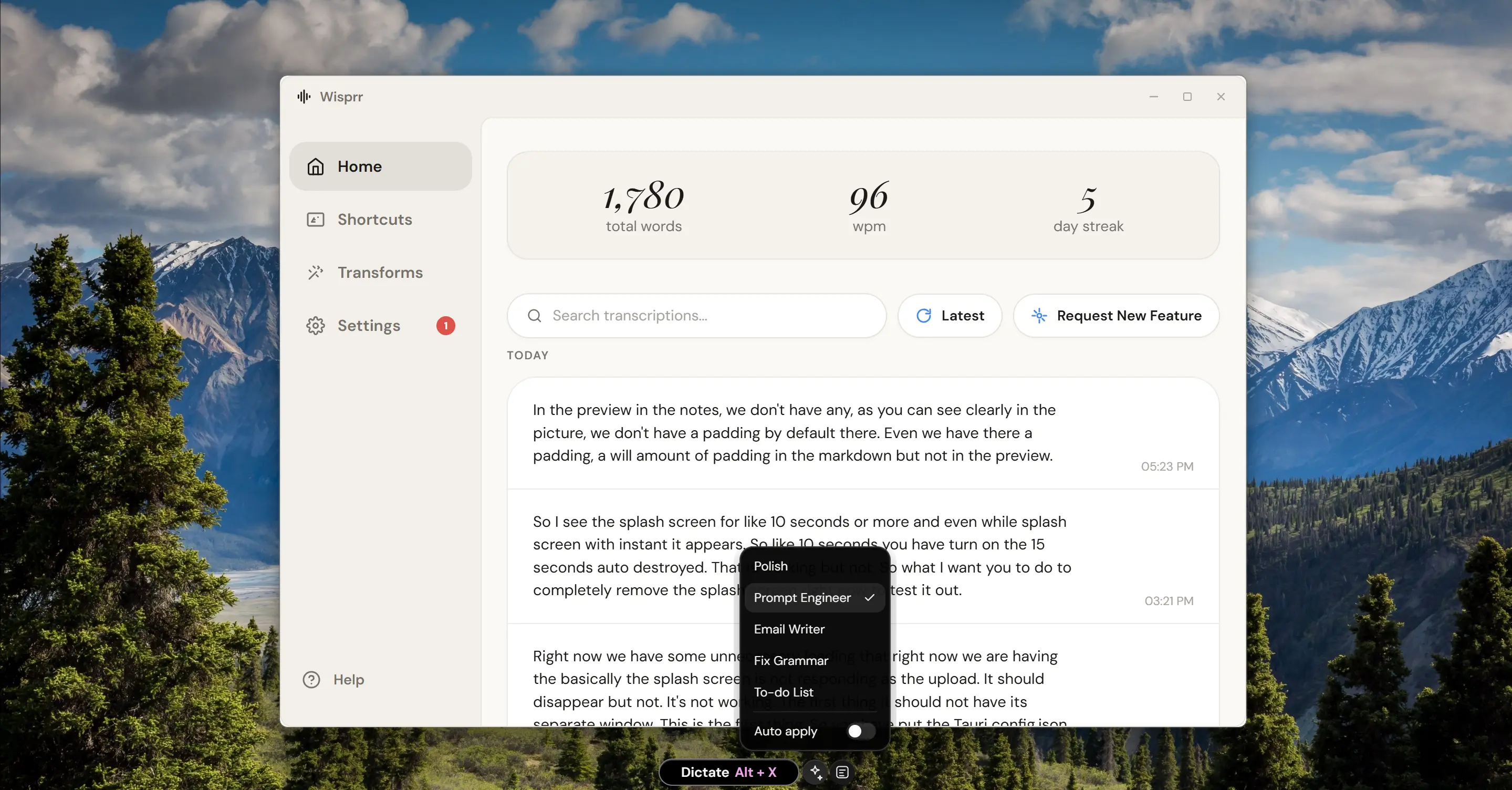
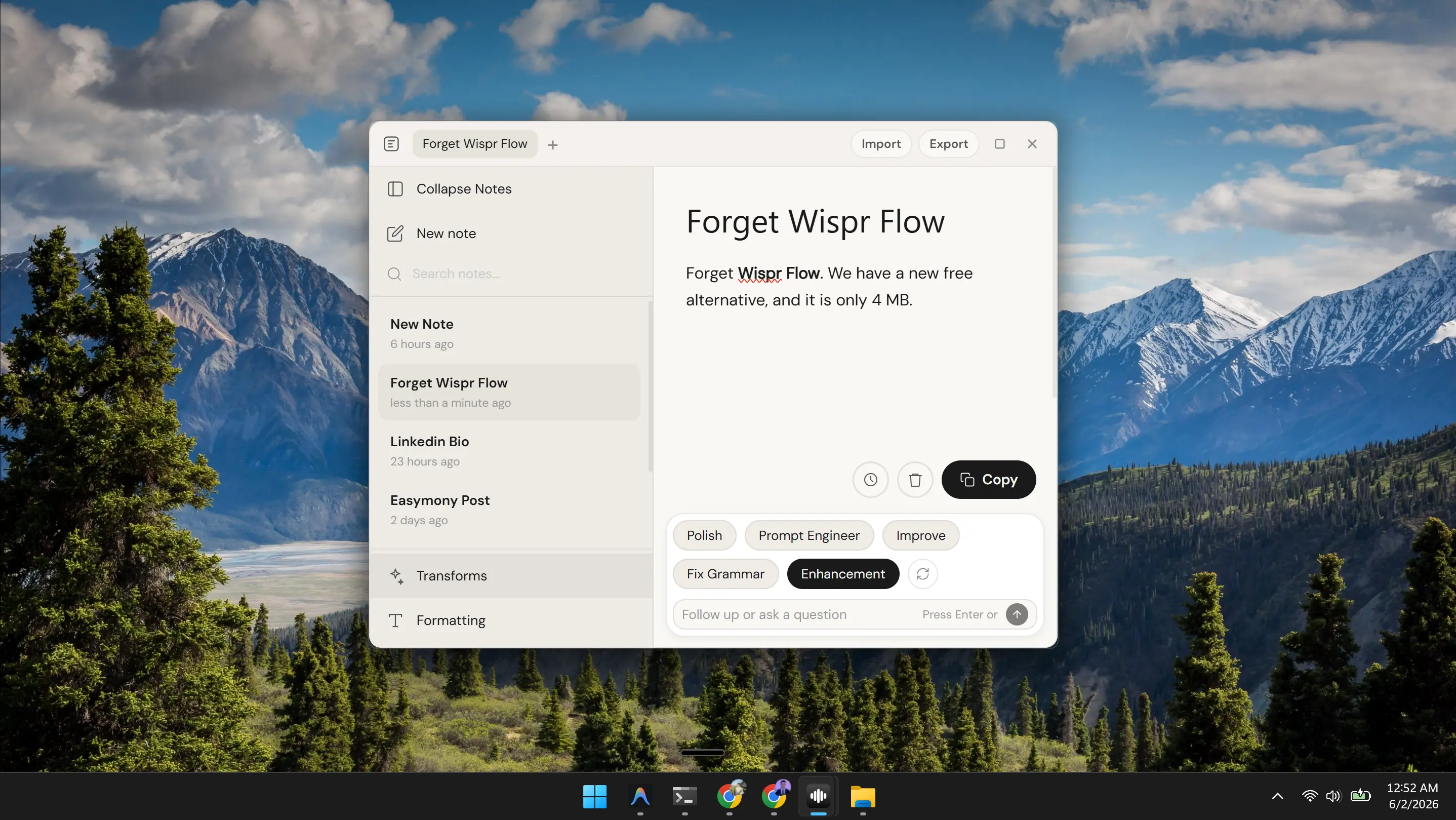
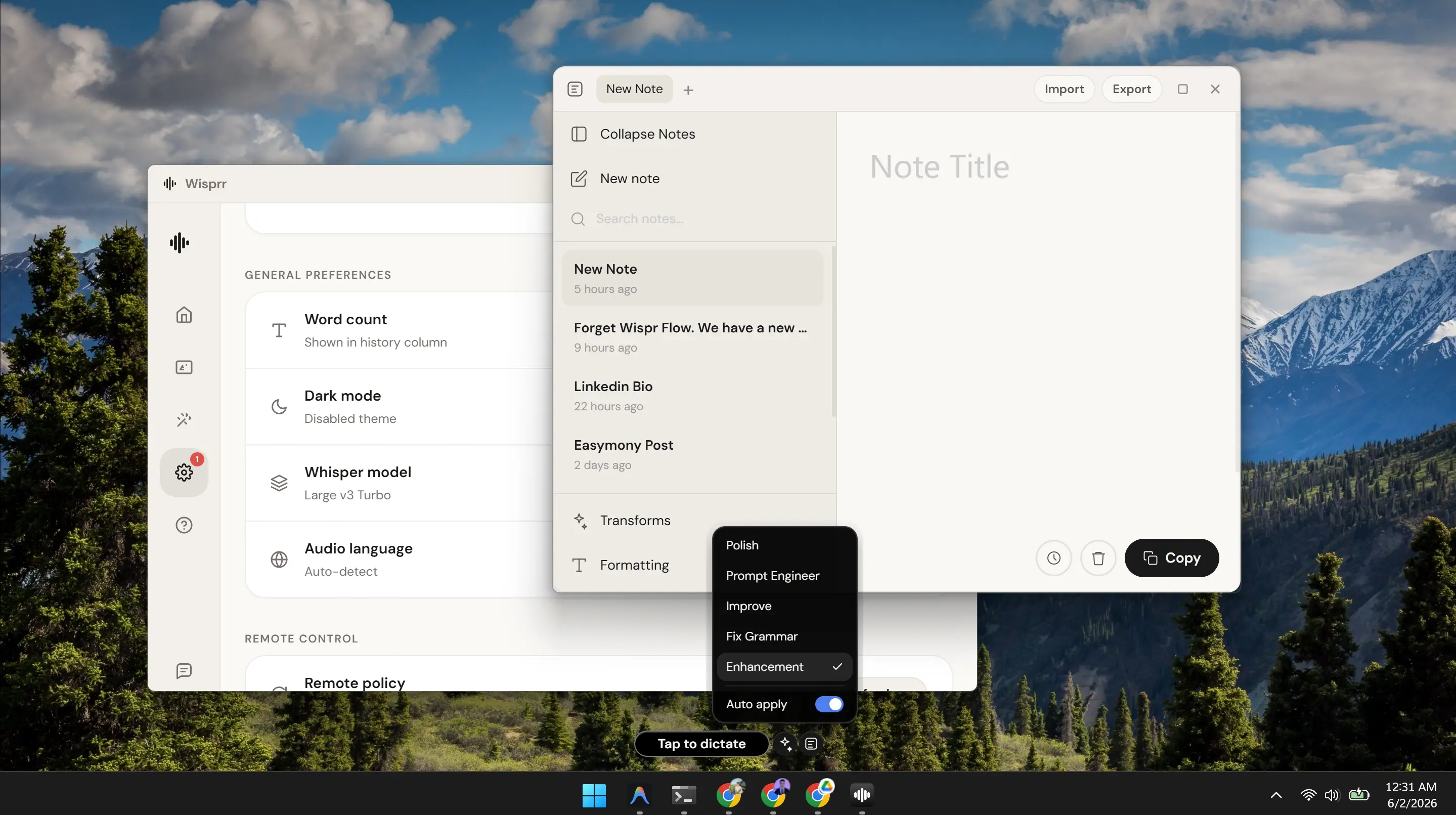
Wisprr Floating Overlay
Productivity

Seamless Workflow

Transcriptions auto-copy to your clipboard and can be pasted directly into any focused text field. From recording to usable text in seconds — no switching apps, no manual copying.

App Experience

Beautifully Crafted Interface

Experience the most intuitive financial management tool ever built for iOS. Designed for clarity, speed, and elegance.

App Screenshot
App Screenshot
App Screenshot
App Screenshot
App Screenshot
App Screenshot
App Screenshot
App Screenshot
App Screenshot
App Screenshot
App Screenshot
App Screenshot
App Screenshot
App Screenshot
App Screenshot
App Screenshot
App Screenshot
App Screenshot
App Screenshot
App Screenshot
App Screenshot
App Screenshot
App Screenshot
App Screenshot
App Screenshot
App Screenshot
App Screenshot
App Screenshot
App Screenshot
App Screenshot
App Screenshot
App Screenshot
App Screenshot
App Screenshot
App Screenshot
App Screenshot
App Screenshot
App Screenshot
App Screenshot
App Screenshot
App Screenshot
App Screenshot
What we offer

We offer a powerful, private,and efficient Voice Recorder

Capture conversations, lectures, and meetings with AI-powered transcriptions. Your voice data stays on your device — always.

Floating Recorder

Record from anywhere with a draggable floating overlay. Works over any app — meetings, browsers, lectures.

AI Transcription

Powered by Groq Whisper large-v3-turbo for lightning-fast, highly accurate speech-to-text conversion.

Auto-Copy to Clipboard

Transcriptions automatically copy to your clipboard. Paste anywhere with a single tap.

Accessibility Paste

Auto-paste transcriptions directly into any focused text field using Android's accessibility service.

Privacy First

Your recordings and transcriptions stay on your device. No cloud storage, no data collection, no tracking.

History Library

Browse, search, and manage all your past recordings and transcriptions in one organized library.

Biometric Lock

Protect your sensitive recordings with PIN or biometric (Face ID/Fingerprint) authentication.

Multi-Language

Transcribe in 100+ languages with automatic language detection. Perfect for international meetings.

FAQs

Frequently asked questions

Everything you need to know about Wisprr — the private, AI-powered voice recorder and transcriber.

01What is Wisprr?
Wisprr is a floating, privacy-first voice recorder and AI transcriber available on Android, iOS, Windows, Mac, and Linux. It records audio through a draggable overlay that works over any app, transcribes your recordings using Groq's Whisper API, and can auto-copy transcriptions to your clipboard or paste them directly into any focused text field. It's designed for meetings, lectures, interviews, and any situation where you need quick, accurate speech-to-text. And it's 100% free — no paid tiers, no hidden costs.
02Is Wisprr really free?
Yes, Wisprr is 100% free. Every feature — unlimited recordings, AI transcription with the Whisper large-v3-turbo model, auto-copy to clipboard, accessibility auto-paste, history library, multi-language support, biometric app lock, desktop apps — is included at no cost. Zero ads, zero data collection, zero paid tiers. Forever.
03How does the floating overlay work?
Wisprr displays a small, draggable floating button on your screen that stays on top of all other apps. Tap it to start recording from anywhere — during a Zoom call, while browsing, or in a lecture. When you're done, the audio is transcribed and the text is ready to use. The overlay is fully customizable and can be moved to any corner of your screen.
04What AI model does Wisprr use for transcription?
Wisprr uses Groq's Whisper large-v3-turbo model, which is one of the fastest and most accurate speech-to-text models available. It supports 100+ languages, handles accents and background noise well, and delivers transcriptions in seconds rather than minutes thanks to Groq's ultra-fast inference hardware.
05Does Wisprr collect or store my voice data?
No. Wisprr is designed with privacy as the default. Your audio recordings are processed for transcription and then deleted. Transcriptions are stored locally on your device in a secure database. We don't have servers for your voice data, so we can't see, access, or sell your recordings. The only data sent externally is the audio snippet during transcription via Groq's API, which is processed and discarded.
06How does auto-copy to clipboard work?
After your recording is transcribed, the text is automatically copied to your device's clipboard. You can then paste it anywhere — in a notes app, email, document, or messaging app — with a simple long-press and paste. This eliminates the need to manually select and copy text from the app.
07What is the accessibility auto-paste feature?
Wisprr can use Android's accessibility service to automatically paste transcriptions into whatever text field you currently have focused. If you're typing in Google Docs and start a Wisprr recording, the transcribed text will appear directly in your document without any manual copying. This feature requires granting accessibility permissions.
08How many languages does Wisprr support?
Wisprr supports 100+ languages through the Whisper model, including English, Spanish, French, German, Chinese, Japanese, Korean, Arabic, Hindi, Portuguese, Russian, and many more. The model can also auto-detect the language being spoken, so you don't need to manually select it before recording.
09Can I use Wisprr without an internet connection?
Wisprr requires an internet connection for transcription since it uses Groq's cloud-based Whisper API. However, audio recording works offline — you can record without connectivity and transcribe later when you're back online. Your recordings are saved locally and queued for transcription when a connection is available.
10What platforms does Wisprr support?
Wisprr is available on all major platforms: Android (Google Play), iOS (App Store), Windows, macOS, and Linux. The mobile apps feature the native floating overlay and accessibility integration. Desktop apps provide full recording, transcription, and history management. Everything is 100% free across all platforms.
11How is Wisprr different from other voice recorder apps?
Unlike most voice recorder apps that just record audio, Wisprr provides instant AI-powered transcriptions. Unlike transcription apps that require you to open the app, record, wait, then manually copy text, Wisprr's floating overlay lets you record from anywhere and auto-copies the result. The privacy-first approach means your data stays on your device, not in some company's cloud.
12Can I search through my past transcriptions?
Yes. Wisprr includes a history library where all your transcriptions are stored and searchable. You can search by keyword, filter by date, and browse your entire transcription history. This makes it easy to find that one important meeting note from weeks ago.
13Does Wisprr work during phone calls or video meetings?
Yes. The floating overlay works over any app, including Zoom, Google Meet, Microsoft Teams, phone calls, and browser-based video conferences. Simply tap the overlay to start recording the audio playing through your device. Note that some platforms may have restrictions on recording — always respect participants' privacy and local laws.
14How accurate is the transcription?
The Whisper large-v3-turbo model achieves industry-leading accuracy, typically 95%+ for clear speech in supported languages. Accuracy may vary with heavy background noise, overlapping speakers, strong accents, or highly technical jargon. For best results, speak clearly and minimize background noise.
15Who built Wisprr?
Wisprr was created by Tony Stacks (Sohail), an independent React Native developer frustrated with voice recorder apps that either charge high subscriptions or upload your recordings to the cloud without consent. The app is a passion project built on the belief that voice tools should be accessible, private, and genuinely useful.
16Is my data safe if I lose my phone?
Your transcriptions are protected by your device's security (passcode, biometrics) plus Wisprr's optional PIN/biometric app lock. Audio recordings are stored locally and can be exported as backups. We recommend regularly exporting your transcription history as a backup file.
17Can I export my transcriptions?
Yes. Wisprr lets you export your transcriptions as text files or share them directly via email, messaging apps, or cloud storage. You can also copy individual transcriptions to your clipboard at any time from the history library.
18What permissions does Wisprr need?
Wisprr requires microphone access for recording, display-over-other-apps permission for the floating overlay, and optionally accessibility service permission for auto-paste functionality. No unnecessary permissions are requested — we only ask for what the app absolutely needs to function.
19How much does Wisprr Free cost?
Wisprr is 100% free. There are no paid tiers, no limits, no hidden costs. Every feature — unlimited recordings, unlimited transcriptions, accessibility auto-paste, priority processing, extended history, desktop apps — is included at no cost.
20Can I use Wisprr for lectures or classes?
Absolutely. Wisprr is perfect for students. Record your lectures with the floating overlay, get a full transcription afterward, and search through the text to find key points. Much more efficient than taking handwritten notes, and you can paste the transcription directly into your study documents.
21Does Wisprr work with multiple speakers?
The Whisper model can handle multiple speakers in a conversation, though it doesn't currently provide speaker diarization (identifying who said what). The transcription will capture all spoken content accurately. For meetings with multiple participants, the full conversation text is still highly valuable.
22How long can I record for?
Free users can record up to a set duration per recording. Free users get extended recording limits. Audio files are stored efficiently, so even long recordings don't consume excessive storage. For very long recordings (multi-hour lectures), we recommend breaking them into segments for faster transcription.
23Will Wisprr add real-time transcription?
Real-time (live) transcription is on our roadmap. This would display transcribed text as you speak, similar to live captions. This feature requires additional optimization and will be available to Free users first. Stay tuned for updates.
24Is Wisprr easy enough for beginners or older users?
Yes. Wisprr is designed to be as simple as possible — tap the floating button to record, tap again to stop, and your transcription is ready. The auto-copy feature means you don't even need to open the app to use the text. The interface is clean and intuitive, with minimal steps and clear visual feedback.

What Our Users Say

View All Reviews

"Before Wisprr, I had to manually type up meeting notes. Now I just record with the floating overlay and the transcription appears in my clipboard. Absolute game-changer for my workflow."

J
James K.
Product Manager

"The floating recorder is genius. I can record lectures without leaving my notes app, and the transcription accuracy is incredible. Best voice tool I've ever used."

M
Maria L.
Graduate Student

"I love how private this app is. My recordings stay on my device, and the transcription is fast and accurate. No cloud storage, no data collection — exactly what I wanted."

T
Thomas R.
Journalist

Latest Voice & AI Insights

View All Articles
W
Wisprr

The privacy-first voice recorder and AI transcriber. Fast, accurate, and always on your device.

Stay Updated

Join our newsletter to get the latest features and updates.

© 2026 Wisprr. All rights reserved.